
Google Images Keyword Tracking – Google changed its referer

20. Mai 2010 | Analysen 5 Kommentare

Since December 2007 it is possible to add new search engines to Google Analytics by adding this snippet to your Tracking-Code:

pageTracker._addOrganic(“images.google.com”,”q”);
pageTracker._addOrganic(“news.google.com”,”q”);

With the new Google Layout – that had its worldwide release on the 05.05.2010Google changed the referers of all vertical search engines.

Screenshot of  Googles new layout on 05.05.2010

Screenshot of Googles new layout on 05.05.2010

After the new Layout was released we had a lot of customers who said: “We think we have a penalty on Google Image Search but the traffic in total is still stable”.
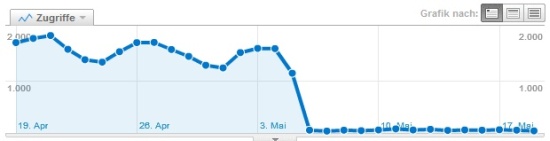

loss of traffic for images.google.com between 04.05. and 06.05.2010

loss of traffic for images.google.com between 04.05. and 06.05.2010


If you take a closer look at the referer google.com you can see that there was a slight increase in traffic between the 04.05. and 06.05.2010. The increase of the traffic from google.com is caused by the  new Image Search Referer http://www.google.com/imgres instead of http://images.google.com/imgres
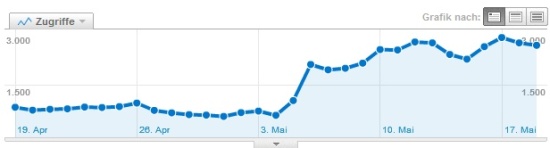

increase of traffic from the referer google.com

increase of traffic from the referer google.com between 04.05. and 06.05.2010


The problem for SEO is that the old _addOrganic-Function is not working anymore. To fix this issue you can use a regular expression for parsing the referer.


New Image Tracking Code for Google Analytics:

    try {
        var pageTracker = _gat._getTracker("UA-XXXXXXX-X");
        var ref = document.referrer;
        if (ref.search(/www.google/) != -1 && ref.search(/prev/) != -1) {

            var regex = new RegExp("www.google.([^\/]+).*&prev=([^&]+)");
            var match = regex.exec(ref);
            pageTracker._clearOrganic();
            pageTracker._setReferrerOverride("http://images.google." + match[1]
            + unescape(match[2]));
            pageTracker._addOrganic("images.google." + match[1], "q");

        }
        pageTracker._trackPageview();
    } catch (err) {}

After installing this snippet on your website you will be able to see all keywords from Google Image SERPs by clicking on the new simulated search engine images.google.com (organic).
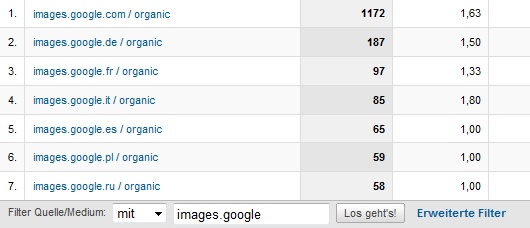
new organic search engines after installing the image kw tracking snippet

new organic search engines after installing the image kw tracking snippet

Have Fun!

Author: Simon

Dies ist nur ein Gravatar

P.S.: Wer schreibt denn hier? Mein Name ist Marcus Tober und ich bin Gründer und Geschäftsführer der Searchmetrics GmbH. Ich liebe Daten, weshalb meine Beiträge in der Regel davon mehr als genug haben. Lasst euch davon nicht stören. Über rege Diskussionen in den Kommentaren freue ich mich sehr, ansonsten findet ihr mich auch bei Google+
Alle Artikel von anzeigen.

Kommentare (4)

  1. 23. Mai. 2010 10.14 Uhr

    Hello,

    thank you for this. Especially for also showing the change in traffic after google launched its new outfit.

    I am using google analytics since a few days and would like to find out the img search keywords.

    I was not able to successfully add in the code snipped you mentioned. Would you be maybe able to explain where exactly it needs to be pasted?

    Kind regards,

    Volker

  2. 04. Jun. 2010 22.12 Uhr

    Thanks for the inspiration Simon, I got a different approach using Google Analytics filter & custom segment http://dynamical.biz/blog/seo-technical/traffic-from-images-search-engines-29.html so no need to change the tracking code.

  3. 14. Okt. 2011 22.43 Uhr

    Hi, I have been looking for a solution for this tracking issue and I’m currently testing a filter that should help to show the image terms in Google Analytics. If that doesn’t work I’ll try your solution as well. The filter was a little easier to setup, that’s why I decided to try it first.

  4. 20. Apr. 2012 05.04 Uhr

    You made some respectable points there. I appeared on the web for the issue and located most individuals will go together with together with your website.

Trackbacks (1)

  1. 25. Mai. 2010 16.33 Uhr

    [...] Searchmetrics kommt einem scheinbar plötzlichen Traffic-Einbruch auf die Spur, der teiweise durch die Einführung des neuen Google-Layouts entstanden ist. [...]

Hinterlasse eine Antwort

Hinweis: Wenn Du hier keinen Namen einträgst (sondern ein Keyword) oder mir Dein Eintrag zu werbelastig erscheint, behalte ich mir das Recht vor Deinen Kommentar zu löschen oder zu editieren. Spart euch sowas hier also bitte!